A WALKTHROUGH FOR TRAVEL AGENTS
See a flight proposal
take shape.
Start with Amadeus flight rows. Add your quotation and baggage details. Copy the itinerary into an email to your client.
Try the sample yourself ↗The built-in sample works without an account. This walkthrough uses invented quotation details and contains no passenger data.
01 / THE FLIGHT ROWS
Chișinău to Thessaloniki, via Istanbul.
Four sample flights, including the return journey. FareDraft expands the airport codes and displays the dates and local times for review.
1  TK 274 V 11OCT 7*RMOIST DK1  1600 1740  11OCT  E  0 7M8 M
2  TK1893 V 11OCT 7*ISTSKG DK1  1900 2025  11OCT  E  0 32B M
3  TK1894 V 14OCT 3*SKGIST DK1  2115 2240  14OCT  E  0 32B M
4  TK 275 V 15OCT 4*ISTRMO DK1  0115 0245  15OCT  E  0 32Q M
The rows omit a calendar year. Check the full dates FareDraft infers against your source before sharing a real proposal.
02 / YOUR QUOTATION
Add the details your client needs.
Baggage: 1 checked bag (23 kg) + cabin bag. Illustrative allowance only.
Client note: Demo quotation only. Price and availability must be confirmed before booking.
You enter the price and baggage allowance. FareDraft does not retrieve live fares or check seat availability.
03 / THE EMAIL PROPOSAL
Review, copy and send.
Select Email Proposal to see the formatted itinerary. Use Copy Email Proposal, then paste it into your usual email app. The client price appears in the proposal; your net price and commission stay in the workspace.
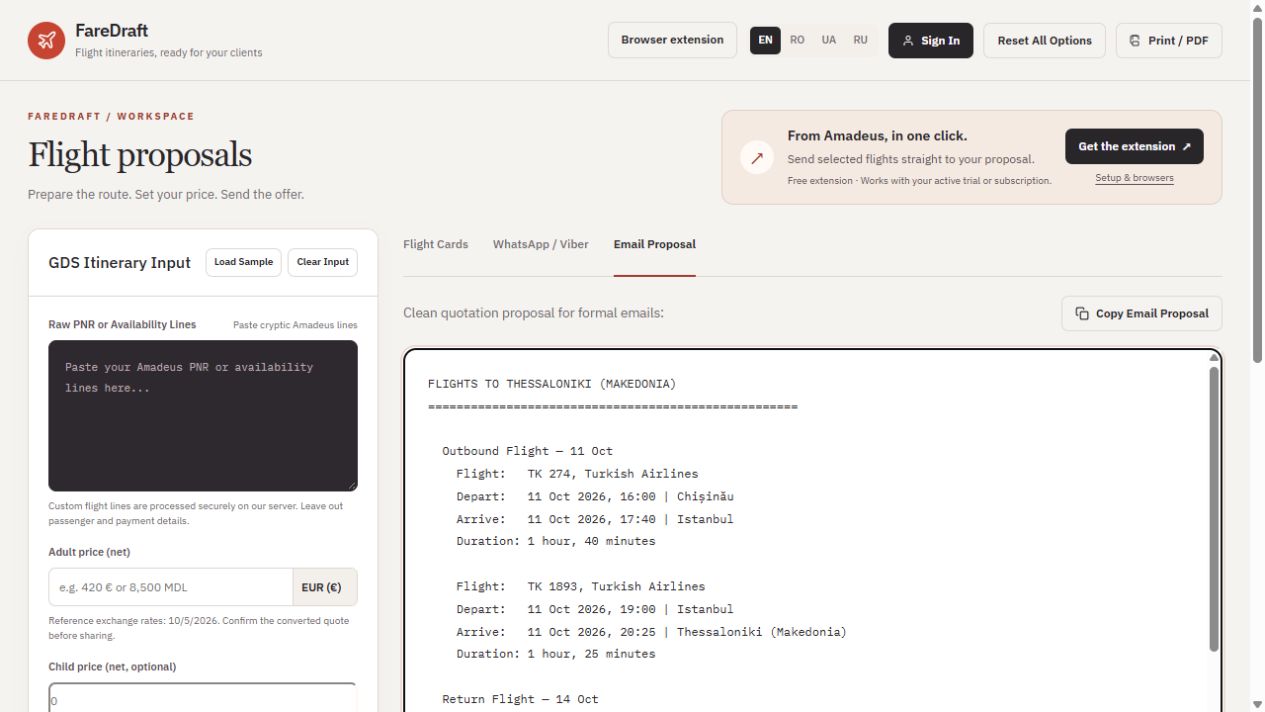
Actual sample output captured on 5 October 2026. Scroll the proposal in the app to review all flights and quotation details. WhatsApp text and Print / PDF are also available.
TRY IT AT YOUR DESK
Would this fit the way you prepare offers?
- Open the workspace. A sample itinerary loads automatically; use Load Sample if needed.
- Edit the sample option and add your quotation and baggage details.
- Open Email Proposal and copy the result.
For your own supported Amadeus flight rows, create an account and confirm your email. The trial includes 20 custom translations over 7 days, with no card required. Leave out passenger and payment details.
I built FareDraft for my wife, who is a travel agent, to save her time when sending offers to clients. I would like to hear where it helps your workflow and where it gets in the way.
George, FareDraft founder